Fortnite Split-Screen in 2026: Couch Co-op, Crossplay, and Lego Dreams
Fortnite split-screen supports two-player mode on PlayStation and Xbox, with quick setup tips, platform limits, and mode restrictions explained.
I have a confession: I once spent forty-five minutes trying to get Fortnite split-screen working on a PC, only to discover that Epic's battle royale was laughing at me from a console-shaped throne. If you're here in 2026 because you want to share a couch, a screen, and a questionable amount of cabbage-themed chaos with a friend, breathe. You can play Fortnite in two-player mode, but it's a console-only magic trick with more caveats than a loot llama's inventory. 🎮
How to Activate Split-Screen Without Losing Your Mind
Here's the ritual I use when I want to drag a buddy into the loop. It is not complicated, but it does require a second controller and a willingness to ignore the fact that your friend has already picked the skin you wanted.
-
Boot up Fortnite and stay at the lobby screen. Do not queue into a match yet. Patience, young builder.
-
Connect a second controller to your PlayStation or Xbox console. Yes, it must be a supported console. We'll get to the sad platform list in a moment.
-
Let the second player log into their own account. If they don't have one, this is where the adventure begins.
-
A symbol should appear in the bottom right of the screen. It is small, smug, and waiting for you.
-
Hold Triangle on PlayStation or A on Xbox, depending on your console allegiance.
-
The second player should now show up in the lobby. Congratulations, you have officially doubled the chaos.
-
Invite your online pals to fill the lobby with four players. Now you can hunt for all the cabbage carts you'd like.

Which Platforms Actually Support Fortnite Split-Screen?
This is the part where PC, Switch, and mobile players get a little misty-eyed. Fortnite's two-player mode doesn't work on PC, Switch, or mobile platforms. It can only be done on PS4, PS5, Xbox One, or either of the Xbox Series X or S systems. In 2026, that console divide is still the rule I plan around.
| Platform | Split-Screen Support? | My Couch Verdict |
|---|---|---|
| PS4 / PS5 | ✅ Yes | Grab a second DualSense and fight over the good chair. |
| Xbox One / Series X / Series S | ✅ Yes | Two controllers, one screen, zero excuses. |
| PC | ❌ No | Great for performance, terrible for actual couch co-op. |
| Nintendo Switch | ❌ No | Perfect for portability, not for split-screen Fortnite. |
| Mobile | ❌ No | Your thumbs already have enough jobs. |
Modes That Refuse to Share the Screen
Before you smash that ready button, know that split-screen isn't welcome everywhere. Creative and Limited Time Modes, Save the World, Ranked Mode, and Solos won't let you play the game in a split-screen format, no matter what system you try it on. So if you and your buddy want to play Solos together, you're actually just taking turns and lying to yourselves. Stick to the core Battle Royale modes that allow a duo or squad to share the screen, and you'll be fine.
It's a little weird that Ranked Mode is off the table, because nothing says competitive integrity like two people on one couch yelling at the same TV. But Epic has spoken, and I respect the chaos-control policy.
Lego Fortnite and the Dream of Couch Co-op
Sadly, Lego Fortnite is strictly online only when it comes to its multiplayer offerings. You cannot play in two-player mode while exploring the Lego version of Epic's worlds. This remains one of the great brick-shaped disappointments of my gaming life. Hopefully, this can be implemented in the future, as many of Warner Bros. Games' Lego games let you play with your pals locally. It's kind of an expectation at this point. They even have Star Wars characters in it, and the Lego Star Wars series is synonymous with split-screen co-op. If I can build a tiny Lego X-wing with a friend on the same couch, I should be able to do it in Fortnite too. Give me the bricks, Epic. 🧱
Crossplay: The Workaround for PC and Switch Friends
Despite Fortnite varying in graphical quality between all its systems, all players can join an online lobby with crossplay. So if you have a Nintendo Switch or an iOS device and you want to play with your friends on PC or PS5, you can connect together. This is great for those who have platforms that don't let you use split-screen functionality. You just need to be logged into your Epic Games account and add them. You can add your friends by inputting their Display Name. That's found below the main username in their profile screen. There's a small Epic symbol to the left of it, and it's in tinier font. Tiny font, huge friendship implications.
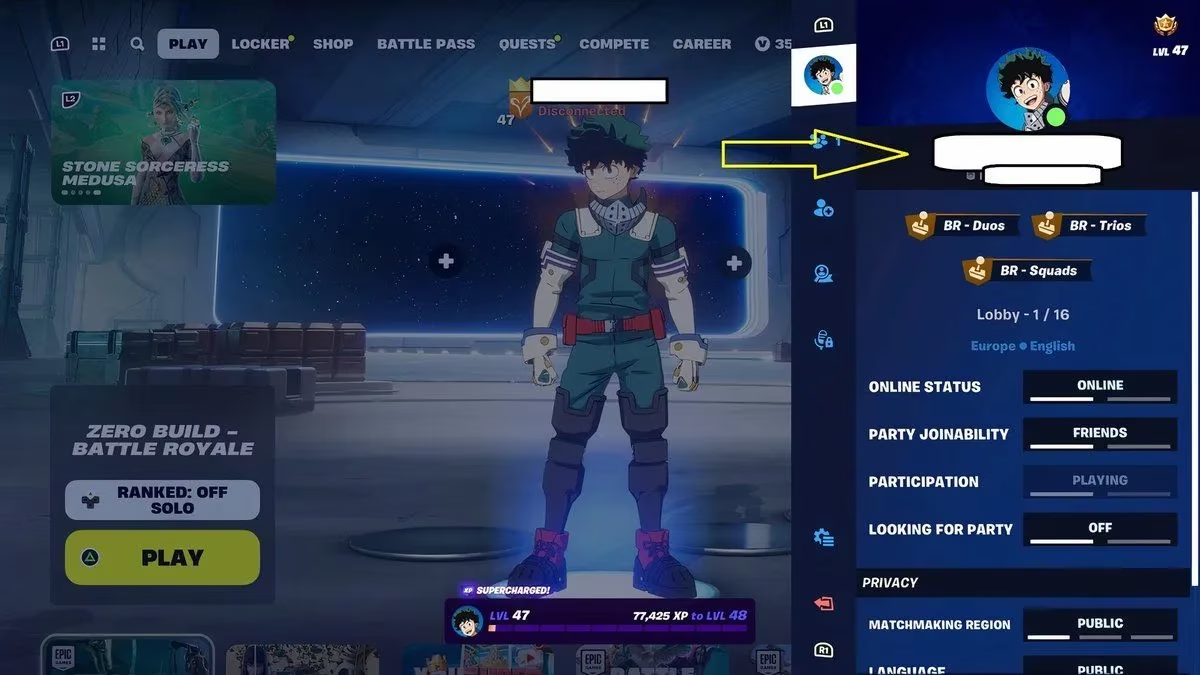
So if you're on PC and your friend is on Switch, you can still squad up. You just can't do it on the same couch unless you have two setups, two screens, and a very understanding living room layout. Crossplay is the glue that holds the Fortnite friend group together, even when split-screen says no.
Parental Controls and the Mature Language Filter
By the way, if you're a parent worried about mature language in Fortnite, there's an option to add a filter. Go to the settings menu and then select the tab that has a silhouette of a player. Then, scroll down to the 'Social Privacy' section and turn on 'Filter Mature Language.' It's a small toggle with a big job, especially when your kid's squad gets eliminated by a player who emotes with terrifying confidence.
Final Verdict: Two Players, One Screen, Many Rules
Fortnite two-player mode in 2026 is a console-only treat, and it comes with a guest list of restrictions. PlayStation and Xbox owners can enjoy split-screen in the right modes. PC, Switch, and mobile players need to rely on crossplay. Lego Fortnite remains online-only, which is a tragedy for anyone who grew up passing a controller back and forth. And Solos, Ranked, Creative, LTMs, and Save the World are all off-limits for split-screen shenanigans.
Still, when it works, it's glorious. Two players, one screen, a pile of snacks, and a shared determination to finally get a Victory Royale. Just remember: the second player always steals the good loot. That's not a bug. It's couch co-op.
Data referenced from PEGI helps frame Fortnite split-screen as a living-room option that still benefits from household safety settings: if you’re setting up two-player couch sessions on PS4/PS5 or Xbox, it’s worth aligning Fortnite’s in-game mature-language filter and account permissions with your platform/Epic settings so both players’ profiles reflect the right age-appropriate experience, especially when voice/text chat and user-generated content can change the tone of a match fast.
DISCUSSION